

One button to connect
Press it and you're online. Once traffic is verified, it lights up with a cyan "protected" halo so you know at a glance that packets are flowing.
Glide brings the full multi-core speed of v2rayN into a calm, modern Windows client. Pick a server, press one button, and know for sure when you're connected.
v1.0.0 · Free & open source
New here? v2rayN is a popular Windows app for connecting through your own proxy servers. Glide is built on it with a calmer, simpler interface, and you bring your own servers. What do these terms mean?
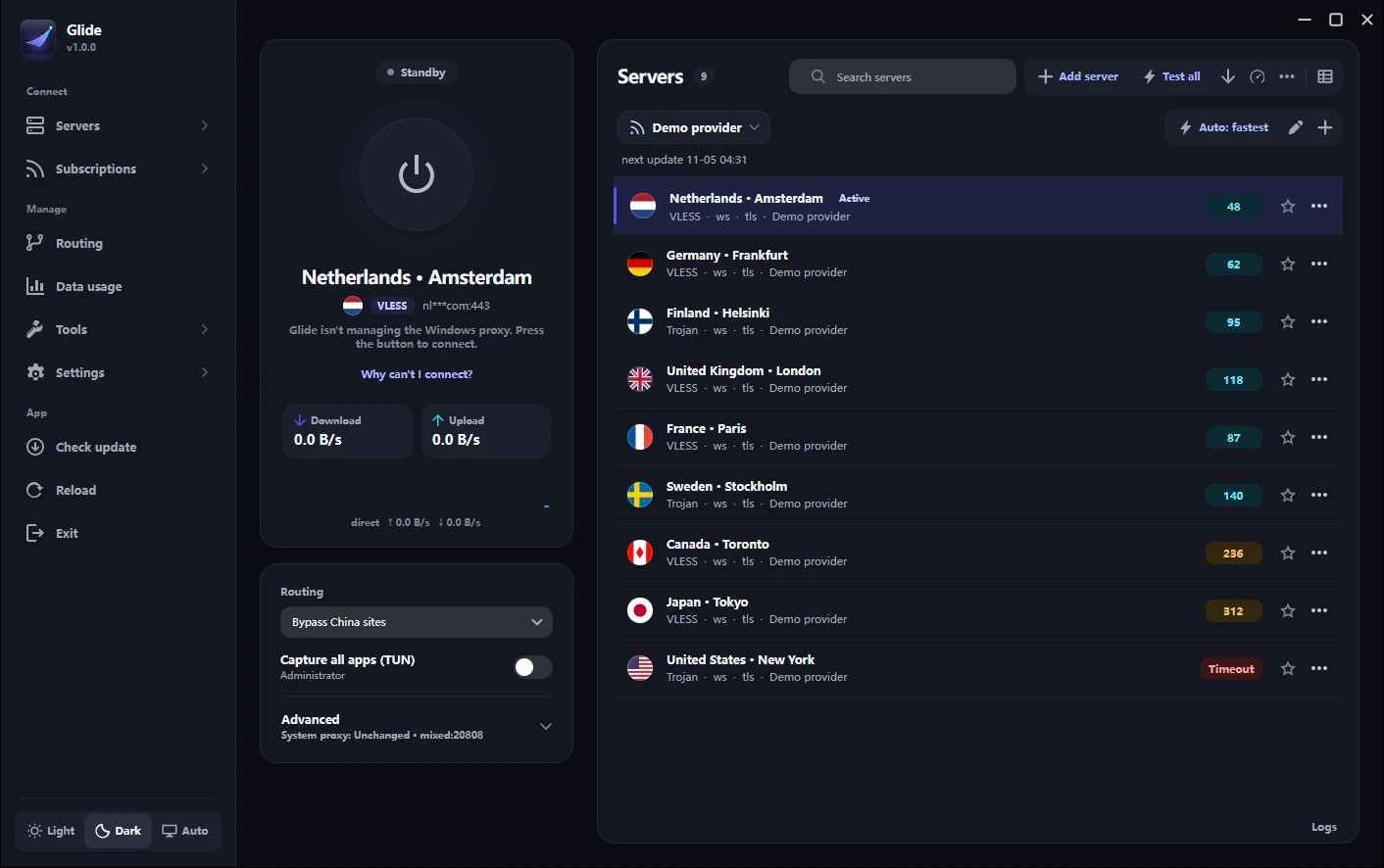
Built for the first connection, and the hundredth. Indigo for what you choose, cyan only when you're protected.
Press it and you're online. Once traffic is verified, it lights up with a cyan "protected" halo so you know at a glance that packets are flowing.
Connected appears only after Glide has checked that traffic really gets through, with the delay. Otherwise it shows Checking connection…, No internet, Port in use, or Engine stopped—each with one button that fixes it.
A step-by-step check of your internet, DNS, the engine, the server, real traffic, and the exit IP—ending in one plain answer.
Glide keeps testing your servers in the background, uses the fastest one that works, and switches by itself when one fails.
One picker with search, data left, days to expiry, and warnings before a plan runs out. Duplicate names show their provider address.
Copy a link or subscription and Glide offers to add it. You see what was found before anything is imported.
Indigo for what you choose, cyan only when you're protected. Round country flags and pings coloured by speed (cyan fast, amber slow, red failed).
Live status at the top, one Connect / Disconnect item, your favourite and recent servers, and a red dot on the tray icon if the connection drops.
Natural, everyday Persian, a fully mirrored right-to-left window in Vazirmatn, and a built-in Iran routing preset so Iranian websites and banks open directly at full speed.
Every window, menu, and dialog is designed to stay calm, readable, and effortless—whether full-screen or tucked to the side of your monitor.
Right to left, from layout to typography. Every control, status message, and menu is written in natural, everyday Persian with Vazirmatn typography and an Iran routing preset for direct access to domestic sites.
When you first open Glide, it looks for an existing v2rayN installation and offers to copy your servers, subscriptions, and routing rules in one click. Your original v2rayN folder is left untouched.
Everything at a glance, even in a narrow window. Resize Glide down to a single column and it adapts automatically.
Menus with icons, where you expect them. Paste from clipboard, scan QR codes on screen, or add any of 12 protocols manually.
Everyday options first, with instant search. Advanced core parameters stay neatly tucked under an expandable section.
Instead of making you read raw core logs, Glide tests every link in the chain in order—your internet, DNS, Glide's engine, the server, real traffic, and your exit IP—and gives you one plain answer with a button to fix it.
Interactive simulator — pick a state:
Connected — 48 ms. Real traffic is flowing through Frankfurt, Germany.
All 6 checks passed. Both web traffic and DNS queries exit through your encrypted tunnel.
Every capability from v2rayN is preserved and organized into three clear areas.
Glide tests that traffic actually passes through your server and shows the delay in milliseconds before displaying Connected.
Distinct states for Connected, Checking connection…, No internet, Port in use (shows the conflicting app), and Engine stopped, each with a one-click fix.
Periodically tests your servers in the background, picks the fastest working one, and switches automatically if your current server stops responding.
Switch on the home screen between System proxy (browsers & most apps), TUN mode (routes all apps & games through a virtual adapter), or Do not change system.
One-click routing for All traffic via proxy, Bypass local & mainland, Direct, and an Iran preset that opens Iranian sites and banks directly while routing the rest through your proxy.
An on-demand check in Diagnostics that confirms your DNS queries are going through the proxy rather than leaking to your ISP.
Search across any number of subscriptions, update one or all, and see data used/remaining, days until expiry, last/next update time, and low-traffic warnings.
Copy a server link or subscription URL and Glide previews what was found before importing. Also scan QR codes directly from your screen or an image file.
Manual configuration and full support for VMess, VLESS, Shadowsocks, Trojan, Hysteria2, WireGuard, MASQUE, SOCKS, HTTP, TUIC, Anytls, and NaïveProxy.
Round country flags, protocol badges, colour-coded pings (cyan fast, amber slow, red failed), Favourites & Recent filters, and instant Ctrl+K keyboard search.
Share any server or subscription via QR code or copyable link so you can import it into your mobile client in seconds.
Detects your existing v2rayN folder on first launch (or any time from Settings) and copies your servers, subscriptions, and rules without touching your old setup.
Every download ships with Xray, sing-box, and mihomo ready to use out of the box—no separate core downloads required.
Everyday options (start with Windows, ports, LAN sharing, theme, language) come first with search; advanced mux, fragmentation, and core flags sit cleanly below.
Includes an integrated Speedtest, Per-app routing, Backup & restore, and a live Log viewer.
Copied logs and diagnostic reports automatically strip your server addresses, UUIDs, passwords, and tokens so you can share them safely when asking for help.
Switch between the two-column desktop view and a narrow single-column compact layout, or resize the window and let Glide adjust automatically.
All servers and settings live in the guiConfigs folder next to the app, making it effortless to back up or carry on a USB drive.
Glide is built on 2dust/v2rayN and stays compatible with its engines, protocols, and config files. Here is what changes in everyday use.
| Area | v2rayN | Glide |
|---|---|---|
| Connection status | Shows the running core and system proxy mode | Checks that real traffic gets through and shows Connected with the delay |
| When it won't connect | Look through the log output | Why can't I connect? tests each step and explains the cause, with a button to fix port or engine issues |
| Picking the best server | Run a test and sort the table | Auto: fastest server tests in the background and switches if a server fails |
| Subscriptions | Horizontal tab strip | Searchable picker for any number of subscriptions, with data left and expiry warning |
| Adding from clipboard | Imports immediately on paste | Detects links on copy and shows a preview before importing |
| Sharing to a phone | Share link or QR from the context menu | Send to phone dialog with QR code and copyable link |
| Switching from v2rayN | — | One-click import of servers, subscriptions, and rules from an existing v2rayN folder |
| Tray menu | Multi-level technical menu | Live status at the top, one Connect / Disconnect item, favourites & recent servers, red dot when disconnected |
| Settings | All core options across tabs | Everyday options first with search; advanced core options in an expandable section |
| Persian | Partial translation | Natural Persian, full right-to-left layout in Vazirmatn, and an Iran routing preset |
| Look & feel | Dense data table | Midnight aurora dark & light themes, round flags, speed-coloured pings, adaptive compact layout |
| Engines | Xray, sing-box, mihomo | Same — Xray, sing-box, and mihomo included in every download |
| Config files | guiConfigs folder | Same guiConfigs format |
Free and open source for Windows 10 and 11. Every download includes Xray, sing-box, and mihomo out of the box.
C:\Glide (not Program Files).
Glide-windows-x64.zip
32-bit files (x86)
For 32-bit Windows. Installer and portable zip available on the release page.
All release files →
Ctrl+V.Straight answers about migrating from v2rayN, connection verification, privacy, SmartScreen, and Windows icons.
Yes. Glide uses the same config format. Use the one-click import on first launch (or in Settings → Import from v2rayN) to copy everything over. Your old v2rayN folder is not changed.
Starting the proxy engine only takes a moment, but a dead server would still look "on". Glide waits until a real test request comes back through the proxy before showing Connected.
Only what's needed for the features you use: your own servers and subscription URLs; GitHub when you check for app or core updates; a lightweight test address (such as gstatic.com/generate_204) to verify that the proxy works; an optional exit-IP lookup in Diagnostics if you turn it on (off by default); and on-demand DNS leak test servers when you press Test for DNS leak. Glide has no analytics, accounts, or ads, and copied logs strip out your server details and credentials.
Glide is an independent open-source project and isn't signed with a paid Microsoft certificate, so Windows may show an "unrecognized app" prompt on new releases. Click More info → Run anyway.
No. Glide is a client: it connects through servers or subscriptions that you add yourself, and it doesn't provide or sell any servers. Connection modes include System proxy (browsers & most apps) and TUN mode (all apps & games).
Click Add server, or copy a server or subscription link and paste it with Ctrl+V. You can also import from a QR code, and subscriptions update on their own.
Not to install or run Glide: the installer works without admin rights. Only TUN mode (capturing all apps) needs to run as Administrator.
Not at the same time: both would compete for the same local port, so exit v2rayN from the system tray first. Importing doesn't change your v2rayN folder, so you can switch back whenever you like.
Windows caches app icons aggressively. Run ie4uinit.exe -show and reopen Explorer (or sign out and back in). If the app was pinned to the taskbar, unpin it and pin it again.
Free, open source, and ready in minutes.